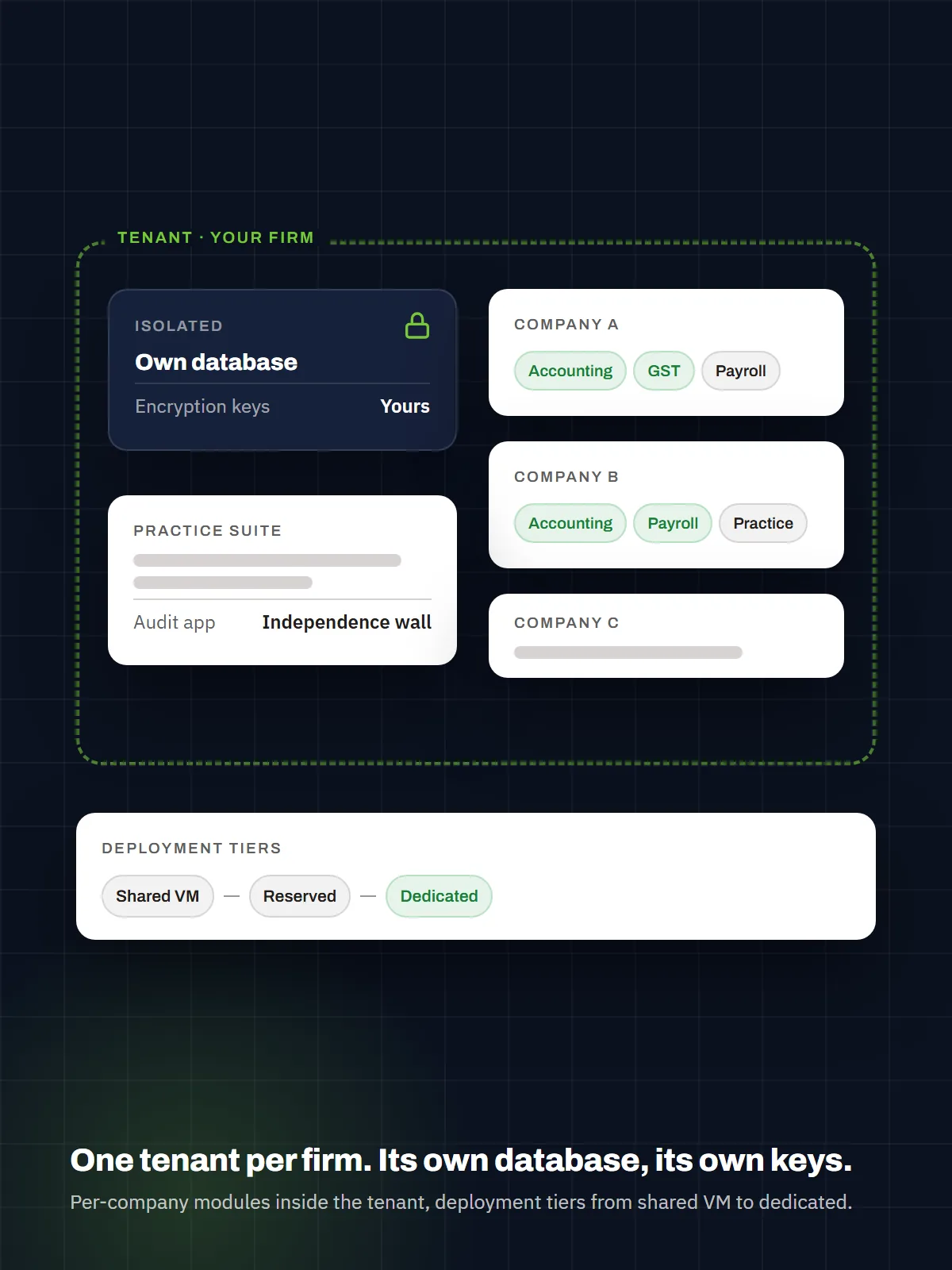
The model in one picture
   TENANT  (= one CA firm, or one business)   ← isolation boundary: own database, own encryption keys
   │
   ├─ Company A ─┬─ Core (always on): GL · Reporting · Workflow/MCA · Audit · Security · Master data
   │             └─ Attached modules: AR/AP · Tax · Payroll · Document Inbox · …
   ├─ Company B ─┬─ Core (always on)
   │             └─ Attached modules: Tax · Bank Rec · Fixed Assets · …
   ├─ Company C … (dozens or hundreds)
   │
   ├─ Firm-wide: Practice suite (Engagement · Query inbox · Client portal · WhatsApp · Chat) · one Tally agent
   └─ Firm-wide: Users, roles, approvals, and reporting — scoped so no data crosses a company line

   AUDIT TENANT (Ganav Audit — a separate application and database for the same firm)
   └─ Never opens the accounting tenant; receives client books only as signed snapshots
One tenant = one firm. Inside it, a firm runs many client companies; each company is a fully governed set of books with its own modules turned on or off. Users, roles, and approvals live at the tenant level and are scoped per company. Nothing crosses a tenant boundary — ever.
A single business that keeps its own books is simply a single-company tenant — same architecture, one company inside.
Data isolation — the non-negotiable principle
For a CA firm, client confidentiality isn’t a feature — it’s the licence to operate. So this is absolute, owner-locked, and true on every plan:
Every firm gets its own separate tenant — its own database and its own encryption keys. Always. Period.
There is no shared-database, “firm-ID-column” multi-tenancy anywhere in Ganav. The isolation boundary never changes with price. The only thing that flexes is the VM the tenant runs on — and that’s a cost/performance choice, not a data-sharing one.
- A dedicated database per tenant. Each firm’s books live in their own database — never a shared table. There is no query path from one tenant to another.
- Separate encryption keys per tenant. The master key (KEK) that protects secrets and PII is held outside the database, per tenant — so even at rest, one firm’s encrypted data can’t be read with another firm’s key.
- Per-tenant backups and retention. Backups, restores, and archival run per tenant, on the firm’s own schedule.
- Shared VM vs. dedicated VM — compute only, never data. A smaller firm’s isolated tenant may share a VM with other firms’ separate tenant databases (co-located to keep cost down — still fully isolated at the database and key level). A large firm takes a dedicated VM for hard compute isolation. Same separation either way.
- Governance inside the tenant, too. Within a firm, Maker–Checker, segregation of duties, role-health, and the immutable audit trail keep staff access correct company-by-company.
The line for the website: “Every firm runs in its own tenant — its own database, its own encryption keys. Your clients’ data is yours alone, and never touches another firm’s. On every plan.”
What attaches to each company — the module catalog
Every company starts with the always-on core. Beyond that, you switch modules on per company (a supermarket doesn’t need intercompany; a dormant holding company needs almost nothing; a services firm wants Payroll). Business-type templates pre-select a sensible default set at company creation, and admins adjust anytime.
| Module | What it gives the company |
|---|---|
| General Ledger & journals | Governed double-entry, day book, recurring journals, opening balances |
| Financial Reporting | Trial Balance, P&L, Balance Sheet, Cash Flow, aging, and more |
| Workflow / MCA | Maker–Checker–Approver, approvals inbox, policy coverage |
| Audit | Immutable audit trail of every action |
| Security | Users, roles, permissions, 2FA |
| Core master data | Currencies, FX rates, fiscal years & periods, voucher types, number series, parties |
| Module | Code | What it adds |
|---|---|---|
| AR / AP & Settlements | ARAP |
Open items, settlement engine, aging |
| Tax engine (GST/VAT) | TAX |
Schemes, tax-on-posting, CGST/SGST/IGST, returns |
| Post-Dated Cheques | PDC |
Full PDC lifecycle |
| Bank Reconciliation | BANK |
Statement import, AI auto-match, post-from-line |
| Fixed Assets | FA |
Categories, depreciation runs, disposals, register |
| Budgeting | BUDGET |
Budget-vs-actual variance, dimension-aware |
| Dimensions / Cost Centers | DIMENSIONS |
Custom analysis axes across every report |
| Archival & Retention | ARCHIVE |
Policy-driven cold storage (also a cost saver — see pricing) |
| Off-ledger Operations | OPS |
External-payment / informational register (no GL impact) |
| TDS | TDS |
8 sections, TDS on bills, 197/206AA, challans, 26Q/24Q + FVU, Form 16A, register, 26AS recon |
| Income Tax | INCOMETAX |
Computation, advance tax, tax depreciation, compliance calendar |
| HR / People | HRM |
Employees, leave, attendance, recruitment, articleship |
| Payroll | PAY |
Indian statutory payroll → posts to GL; employee portal |
| Document Inbox (AI) | DOC |
OCR → auto-coded draft journals, STP, duplicate guard |
| Engagement (practice) | ENG |
Monthly cycles, templates, cross-company month-end board |
| Queries & Client Portal (practice) | CLR |
Cross-company query inbox, email, client portal |
| Team Chat | CHAT |
Channels/DMs with accounting RecordCards |
| WhatsApp channel (practice) | WA |
Client bills into the Inbox, per-company staff inbox, replies, send published docs |
| Tally connector | — | Live two-way sync + guided migration |
| Zoho Books connector | — | Outbound mirror with exact GST splits |
The practice modules (Engagement, Queries/Portal, WhatsApp, Chat) and the Tally agent operate firm-wide across companies — that’s what makes the tenant a firm’s operating system, not just N separate ledgers.
Deployment tiers — from solo to large firm
The tenant is always separate (own database + keys). What changes across tiers is only the VM it runs on and the backup/SLA/support that ride with it.
| Tier | VM & infra (tenant is always its own DB + keys) | Right for | Company scale |
|---|---|---|---|
| Cloud — Standard | Your isolated tenant DB on a shared VM (co-located with other firms’ separate databases); per-tenant keys & backups; email support | Solo practitioners, small firms, single businesses | up to ~25 companies |
| Cloud — Professional | Isolated tenant DB on a shared VM with reserved resources; daily backups; 99.5% SLA; priority support | Mid-size firms | ~25–100 companies |
| Dedicated VM (special/enterprise) | Isolated tenant DB on a private virtual machine — own CPU/RAM/storage, isolated network, region choice, dedicated backups, 99.9% SLA, named contact | Large firms with big books or hard-isolation needs | 100+ companies |
| Azure in your name | The same managed Ganav, provisioned in a Microsoft Azure subscription held by the firm and run by BLS Software as its Microsoft Indirect Reseller; Indian region | Firms whose residency or contractual mandates need the infrastructure in their own name | Any |
How it is installed and kept current. Every tier is stood up by the same guided installer (menu-driven, crash-resumable, with a configuration doctor); multi-node deployments add nodes with a “join existing deployment” role and a cross-node parity check. Upgrades are per tenant from signed release batches: the new build must pass a startup check before it replaces the running one, the previous binaries are snapshotted for a one-command rollback, an older package can never overwrite a newer install, and the exact build is visible in the product’s account menu.
How to size it (sales guide): count of companies is the first signal, transaction volume the second. A firm with 15 mostly-dormant clients fits Cloud Standard (shared VM); a firm with 60 active clients needs Cloud Professional (reserved resources); a firm with 150+ companies (or one that requires its own machine) goes Dedicated VM — the “special” tier the largest firms get, priced to the VM they need. In every case the firm’s tenant is its own isolated database.
How packaging maps to price
Three components, each tracking a real cost:
- Tenant platform fee — covers the isolated tenant (database, keys, backups, updates), the firm-wide practice suite, one Tally agent, and the support/SLA tier. Scales with the deployment tier above — this is where a large firm’s dedicated VM is priced.
- Per active company — size-banded by real voucher volume (Micro / Standard / Active), with a firm-wide volume discount. Core accounting modules included.
- Module add-ons & usage — Payroll per company; AI Document Inbox metered per document; overages on transactions and storage (with archived data billed cheaper).
This means: a small firm pays a small platform fee + a handful of banded companies; a large firm pays a dedicated-VM platform fee + many banded companies at a volume discount. Price rises with the firm’s real size and the resources it actually consumes — never a flat number that overcharges the small and undercharges the large.